
Website Ownership: the complete guide.
Do you actually own your business website, or are you just renting it? This guide explains what website ownership really means, what you should own, and how to make sure no one can hold your site hostage.
Most business owners assume that because they paid for a website, they own it. Very often, they don't. They own the bill. The website, the domain, the files, and even the customer emails can quietly belong to the platform or agency that built it.
This guide fixes that. In plain English, you'll learn what website ownership means, exactly what you should own, why so many businesses don't, and the questions to ask so you never get locked in. No jargon, no sales pitch, just the facts you need before you build, buy, or renew a website.
What is website ownership?
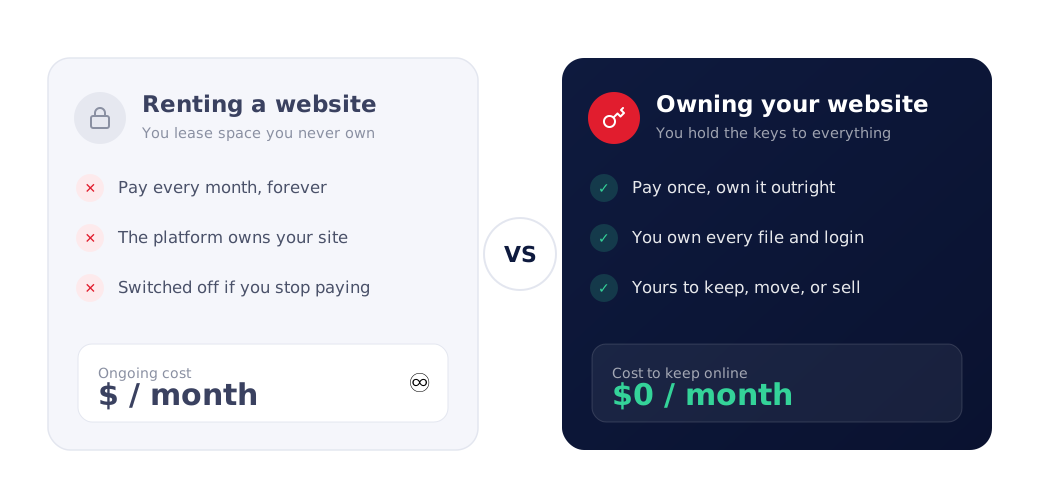
Website ownership means you fully control every part that makes up your website: the domain name, the hosting account, the website files and source code, and the content. All of it is registered in your name, under logins only you hold, so you can edit, move, or hand it to anyone at any time.
Here's a simple way to picture it. Think of your website like a shop.
- Owning your website is like owning the building. You hold the deed. If you want to renovate, move, or sell, you can, and nobody can lock the doors on you.
- Renting your website is like leasing a stall in someone else's mall. It looks like your shop, but the landlord owns the space. Stop paying rent, and everything inside disappears, along with the address customers used to find you.
Both can look identical from the street. The difference only shows up the day you want to leave, raise prices, or the landlord changes the rules. That's why ownership is the single most important question to settle before you build a website, not after.
Why website ownership matters
A website isn't just a brochure anymore. For most small businesses it's the front door, the phone line, and the first impression all at once. When you don't own it, you're building your most important marketing asset on rented land.
Here's what's really at stake:
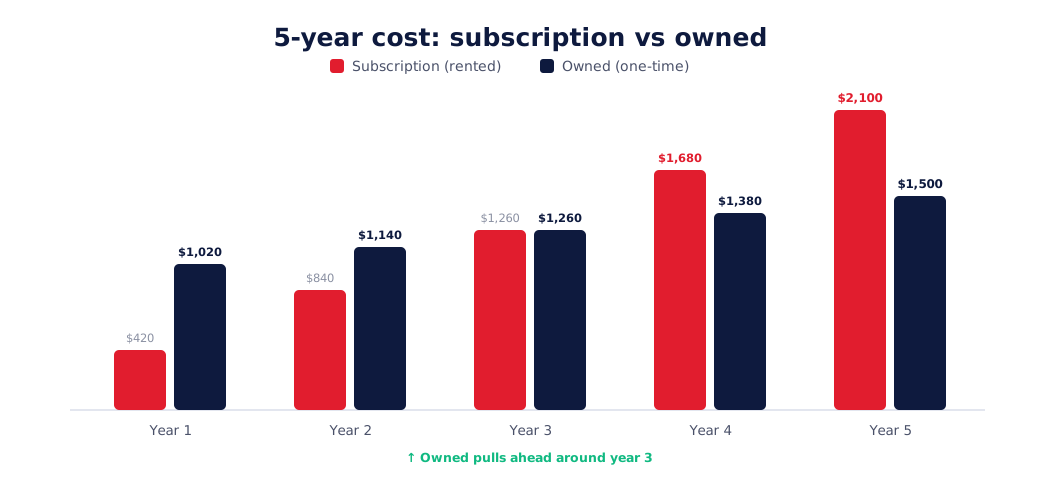
- Your money. Rented websites charge every month, forever. Over five years, a "$40/month" site quietly costs $2,400 and you still own nothing at the end.
- Your leads. If the platform shuts your site off, the calls and form submissions stop that day.
- Your Google rankings. Rankings you spent months earning can vanish if you're forced to rebuild on a new address.
- Your freedom. When one company controls your site, you can't shop around, switch designers, or negotiate. You're stuck.
- Your business value. If you ever sell your business, an owned website transfers to the buyer. A subscription usually can't.
The core idea: An owned website is an asset you keep. A rented website is an expense you never stop paying, and it can be taken away.
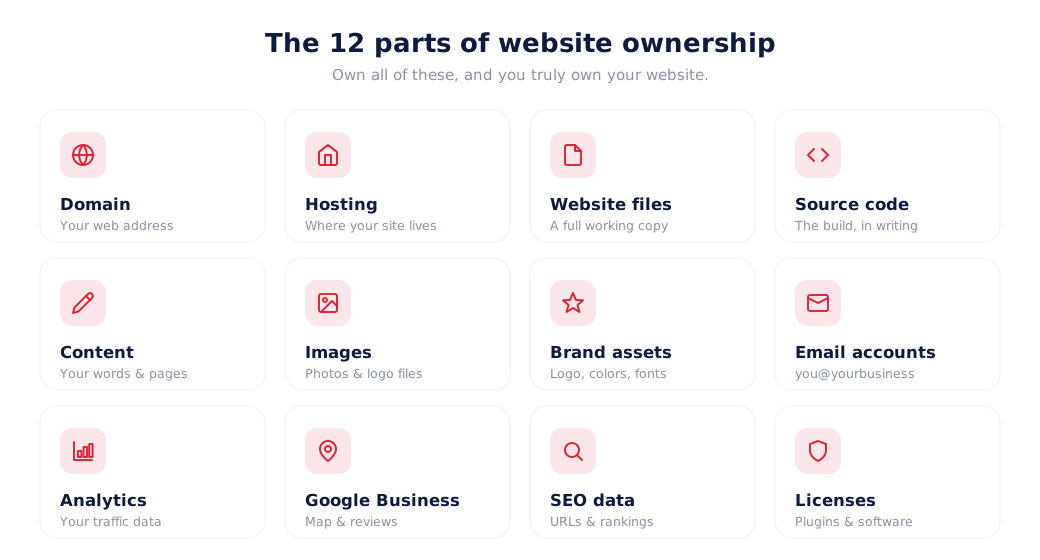
What you actually own (12 things to check)
"The website" is really a bundle of separate pieces. You can own all of them, some of them, or almost none of them. Here's every part that should be yours, and what each one means.
Domain name
Your web address (yourbusiness.com). Should be registered in your name, on an account you log into.
Hosting account
The server space your site lives on. Should be in your name so you decide if the site stays online.
Website files
The actual pages, themes, and database. You should be able to download a full working copy.
Source code
The underlying code of a custom build. Confirm in writing that it's delivered to you.
Content
Your words, page copy, blog posts, and service descriptions. Keep master copies you can reuse anywhere.
Images & photos
Logos, product shots, and photos you created or paid for. Keep the originals off the platform.
Brand assets
Your logo files, colors, and fonts. These are yours to use across every site and print material.
Email accounts
Business email on your domain ([email protected]). Tied to the domain you should own.
Analytics
Your Google Analytics and traffic data. Set it up under your own Google account, not the designer's.
Google Business Profile
Your map listing and reviews. Make yourself the primary owner, not just a manager.
SEO data
Your URLs, structure, and rankings. Owning the site means you keep these if you ever move.
Licenses
Any paid plugins or software the site uses. Confirm the licenses are registered to you.
Quick test: If you can log in to your domain, hosting, files, and content yourself, right now, without asking anyone, you're in a strong ownership position. If you can't, that's the gap to close.
What you don't own (even when you "own" your site)
Ownership has fair limits, and honest ones are nothing to worry about. Even with a fully owned website, a few things are usually licensed rather than owned:
- The platform itself. If your site runs on WordPress, you own your site, not WordPress. That's fine, because WordPress is open-source and free to move.
- Stock photos and fonts. These are licensed for use. You can use them, but you didn't buy the copyright.
- Third-party tools. Booking widgets, chat apps, or payment processors are services you subscribe to, not things you own.
- Templates you didn't pay to own. A theme may be licensed for your site but not resold.
The key difference: with an owned website, none of these limits trap you. You can swap a stock photo, change a plugin, or move hosts freely. With a rented website, the platform itself is the thing you can't escape, and that's the trap.
Why most businesses don't own their websites
It's rarely because owners don't care. It's because ownership is almost never explained. Here's how it usually happens:
- Convenience by default. Builders like Wix make it easy by putting the domain, hosting, and files all on their platform. Easy to start, hard to leave.
- Agencies keep the keys. Some agencies register your domain and hosting under their accounts "to make support easier." It also makes leaving hard.
- Monthly pricing hides the trade-off. A low monthly fee feels affordable, so few people ask, "What do I actually own for this?"
- No one reads the fine print. Ownership terms are buried in contracts and terms of service that most owners never see.
The lock-in playbook: Make setup effortless, keep the accounts in the provider's name, and bill monthly. Nothing looks wrong, until the day you try to leave.
Website subscription vs ownership
This is the heart of it. A subscription website is one you pay for monthly and never truly own. An owned website is a one-time build that becomes your property. Here's the honest comparison:
| Subscription website | Owned website |
|---|---|
| Pay every month, forever | Pay once, then just domain + hosting |
| You own little or nothing | You own everything |
| Site goes offline if you stop paying | Site stays online, it's yours |
| Locked to one platform | Move to any host or developer |
| An ongoing expense | A business asset |
| Can't transfer if you sell | Transfers with your business |
Website builder vs custom website
Website builders (Wix, Squarespace, GoDaddy) and custom websites (usually WordPress) solve the same problem in very different ways. Neither is "bad," but only one leaves you owning the result.
| Website builder | Custom website |
|---|---|
| Rented monthly, never owned | Built once, owned outright |
| Can't be moved off the platform | Move to any host anytime |
| Template-based, limited layout | Designed around your business |
| SEO limited by the platform | Full control of SEO structure |
| Slower as you add features | Built for speed and growth |
| Cheap to start, costly long-term | One-time cost, no rent |
Rule of thumb: If your website is a hobby or a quick test, a builder is fine. If it's how customers find and trust your business, own it.
Can you own a Wix website?
Not really. With Wix you can register your domain in your name, and you own your text and photos. But you cannot export a Wix site and move it to another host. The design and structure are locked to Wix. If you stop paying, your site goes offline. So a Wix site is closer to renting: fine to start, but you don't own the thing that matters most.
Can you own a Squarespace website?
No, not the site itself. Squarespace is the same story as Wix. You own your content and can point your own domain at it, but there's no way to export a full working website and take it elsewhere. Leave Squarespace and you leave the site behind. You'd have to rebuild from scratch on a new platform.
Can you own a Shopify store?
Partly. Shopify is more flexible than Wix or Squarespace. You own your products, customer list, and content, and you can export a lot of your data. But the storefront runs on Shopify and can't be moved off the platform. Cancel your plan and the live store closes. For selling online it's powerful, but the store itself is rented, not owned.
The pattern: On closed platforms you can usually own your content and domain, but not the website. To own the whole thing, you need a custom, portable build (like self-hosted WordPress) on your own hosting.
Can you move your website?
It depends entirely on how it was built:
- Custom site (e.g. self-hosted WordPress): Yes. With the files, database, domain, and logins, any developer can move it to a new host in a day, with no downtime and no lost rankings.
- Website builder (Wix, Squarespace): No. There's nothing portable to move. You keep your domain and content, but the site has to be rebuilt.
This one question, "can I move it?", is the clearest test of ownership. If the answer is no, you're renting.
What happens if your agency disappears?
Agencies close, get bought, or simply stop replying. What happens next depends only on who holds the keys.
If you own everything: nothing breaks. Your site keeps running on your hosting. You hire a new developer, hand them your logins, and carry on. It's an inconvenience, not a crisis.
If the agency held the keys: you may lose access to your website, your domain, your business email, and years of SEO overnight, and have little legal recourse if it was all in their name. Many businesses only discover this at the worst possible moment.
Real risk: If your domain is registered to your agency and they vanish, you can lose your web address and email entirely, even though your customers know it as yours.
How to check if you own your website
You don't need to be technical. Work through these five steps. If you clear all five, you own your site.
- 1Log in to your domain registrar. Find where your domain is registered (GoDaddy, Namecheap, etc.) and confirm the account and login are yours.
- 2Log in to your hosting. Confirm you have your own hosting account and can reach the control panel.
- 3Download your files. Make sure you can export or back up a full working copy of the site and its database.
- 4Confirm the source code. For a custom site, check your contract says the code is yours and you have it.
- 5Hold every login. Domain, hosting, website admin, email, analytics, and Google Business Profile should all be accessible by you.
Not sure where your website stands? Send us your details and we'll tell you honestly what you own, and what it would take to own all of it.
Get a free ownership check →Questions to ask before hiring a web designer
Ask these before you pay a cent, and get the answers in writing. A good designer will answer them happily. If someone dodges them, that's your answer.
- ✓Will the domain be registered in my name, on my account?
- ✓Will the hosting be in my name, or under yours?
- ✓Do I get the full website files and, for a custom build, the source code?
- ✓Can I move the site to another host or developer later?
- ✓What happens if we stop working together, do I keep everything?
- ✓Is this a one-time cost or a monthly subscription?
- ✓Who owns the content, images, and any licenses?
- ✓Will I have every login: domain, hosting, admin, email, analytics?
The website ownership checklist
Here's the whole thing on one card. Screenshot it, or use it before your next website decision.
You own your website when…
- Your domain is registered in your name
- Your hosting account is in your name
- You can download the full website files and database
- The source code has been handed to you (custom builds)
- Your content and images are backed up and reusable
- Your email, analytics, and Google Business Profile are yours
- You hold every login and can move the site anytime
- You pay once, not forever, to keep it online
Common website ownership myths
"I paid for it, so I own it."
Paying for a website doesn't guarantee ownership. Many owners pay monthly for a site that belongs to the platform. Ownership depends on whose name the domain, hosting, and files are in.
"My domain is mine, so my website is mine."
Owning your domain (your address) is not the same as owning your website (the building). You can own one without the other.
"Owning a website is complicated and expensive."
Owning is usually simpler and cheaper long-term. A one-time build plus low-cost domain and hosting beats paying monthly rent for years.
"If I ever need to move, I'll just export my Wix site."
Closed builders like Wix don't let you export a working site. There's no export button that saves you here.
"Ownership only matters for big companies."
It matters most for small businesses, because losing your site, leads, or rankings does the most damage when you're small.
Real-world examples
The plumber who lost his number. A plumber's "web guy" registered the domain and set up the business email under his own account. When they fell out, the plumber lost the email address printed on his vans and had to start over. Had the domain been in his name, none of it would have happened.
The clinic paying rent on nothing. A dental clinic paid $120/month for four years on a platform, over $5,700, and owned nothing. A one-time custom build would have cost a fraction and left them with an asset.
The restaurant that moved in a day. A restaurant on self-hosted WordPress switched to a faster host and a new designer with zero downtime and no lost rankings, because they owned the domain, files, and code. Ownership made the switch a non-event.
Expert advice
"Before you talk about design, colors, or features, settle one thing: who will own the finished website? If the answer isn't clearly 'you,' don't build it there."
— The GetOwnWeb team, on 15+ years of small business websitesThe businesses that never get burned all do the same thing: they treat their website like property, not a subscription. They keep the domain in their name, hold their own logins, and insist on a copy of everything. It takes five minutes to ask the right questions, and it can save you your site.
Frequently asked questions
What does it mean to own your website?
Owning your website means the domain, hosting account, website files, source code, and content are all in your name and under your control. You can edit, move, or hand the site to another developer at any time without asking permission or losing anything.
Who owns my website?
Whoever controls the domain, hosting, and files owns the website in practice. If you signed up and pay for the domain and hosting yourself, you likely own it. If a builder or agency set everything up under their own accounts, they may control it, even though it is "your" business site.
Do I own my Wix website?
You own your content and can register the domain in your name, but you do not own the Wix platform or your site files. Wix sites cannot be exported and moved to another host, so if you stop paying, the site goes offline. In that sense, you rent a Wix site rather than own it.
Do I own my Squarespace website?
You own your content and domain, but not the underlying site. Squarespace does not let you export a full working website, so you cannot move it to another host. Stop paying and the site comes down.
Do I own my Shopify store?
You own your products, customer data, and content, and you can export much of it. But the storefront itself runs on Shopify and cannot be moved off the platform. If you cancel, your live store closes.
Can I move my website to another host or developer?
If your site is custom-built (for example on WordPress) and you have the files, database, domain, and logins, yes, any developer can move it. If it was built on a closed builder like Wix or Squarespace, the design cannot be exported and would need to be rebuilt.
What is the difference between owning a website and owning a domain?
Your domain is your address (yourbusiness.com). Owning it means the registration is in your name. Owning the website means you also control the hosting, files, and code that make up the actual site. You can own your domain but still not own the website itself.
What is website hosting, and do I own it?
Hosting is the server space where your website files live so people can visit them. You own hosting when the account is in your name and you hold the login. If your designer keeps hosting under their account, they control whether your site stays online.
Do I own the source code of my website?
You own the source code only if your contract says so and the files are handed to you. Many agencies keep the code, or build on a platform where there is no portable code to give. Always confirm code ownership in writing before you pay.
What is vendor lock-in?
Vendor lock-in is when your website is tied to one company so tightly that leaving means losing your site, your rankings, or both. Closed platforms and agency-controlled accounts are the most common causes.
What happens to my website if my web designer or agency disappears?
If you own the domain, hosting, and files, nothing changes; you hire someone new and carry on. If the agency controlled those accounts, you can lose access to your site, email, and domain, and may have to rebuild from scratch.
How do I check if I own my website?
Confirm four things are in your name with your own logins: the domain registration, the hosting account, the website files and database, and the content. If you cannot log in to all four yourself, you probably do not fully own your site.
Is a website an asset I can put on my books?
A website you own outright is a business asset, like equipment or a vehicle. A subscription website is an ongoing expense you never stop paying. Owned sites can add value if you ever sell the business; rented ones usually cannot transfer.
Why don't most businesses own their websites?
Because it is rarely explained. Builders and many agencies make setup easy by putting everything on their own platforms and accounts. It feels convenient, but it quietly leaves ownership and control with them, not you.
Can I transfer my website to a new company?
Yes, if you own it. You transfer the domain, hand over the hosting and files, and share the logins. A custom, owned website moves cleanly. A builder site cannot be transferred and would need rebuilding.
Does owning my website help my SEO?
Indirectly, yes. Ownership means you control your URLs, site structure, and content, and you can move without losing rankings. Renting can mean losing all your SEO the day you leave the platform.
Is a custom website better than a website builder?
For businesses that plan to grow, usually yes. A custom site is faster, more flexible, better for SEO, and you own it. Builders are cheaper to start but cost every month and keep you locked in.
How much does it cost to own a website?
A custom, fully-owned website is typically a one-time cost. At GetOwnWeb it starts at $900, after which you only pay for your own domain and hosting (usually a small yearly cost), with no monthly platform rent.
Do I own the content and images on my website?
You own content and photos you created or paid for. Stock photos and platform templates are usually licensed, not owned, so read the terms. Always keep original copies of your logo, images, and text.
What questions should I ask before hiring a web designer?
Ask who will own the domain, hosting, files, and code; whether accounts will be in your name; whether you can move the site later; what happens if you stop working together; and whether the cost is one-time or ongoing. Get the answers in writing.
Can I own an email address on my domain?
Yes. Business email like [email protected] is tied to your domain. If you own the domain and email setup, your email stays with you. If a provider controls it, you can lose your inbox when you leave.
What is a website ownership checklist?
It is a short list you use to confirm control of your site: domain in your name, hosting in your name, files and database in hand, source code delivered, content and images backed up, and all logins held by you.
Is website ownership only for big businesses?
No. Ownership matters most for small businesses, because losing your site, leads, or rankings hurts them the hardest. A plumber or dentist gains just as much from owning their site as a large company does.
Can I own a WordPress website?
Yes. Self-hosted WordPress (WordPress.org) is one of the most ownable options: you control the files, code, hosting, and domain, and you can move to any host or developer. WordPress.com plans are more limited, so check which one you are on.
The bottom line
Your website is too important to rent. It's how customers find you, judge you, and reach you. When you own it, the domain, hosting, files, code, and content, you control your own front door. No one can raise your rent, lock you in, or switch off your business overnight.
Owning your website isn't harder or more expensive. It's usually both simpler and cheaper over time. The only thing standing between most businesses and ownership is knowing to ask for it. Now you do.
Ready to own your website?
Get a custom, SEO-ready website you fully own for a one-time flat fee. No monthly rent, no lock-in. You only pay once it's live and you're happy.
- ✓ No zoom calls, ever
- ✓ Pay only when it’s live
- ✓ Your domain, your code, your keys
No spam. No obligations. No credit card required.